Beeper in 2026: How to Combine WhatsApp, Telegram, Signal, Discord and Other Messengers in One App
Keeping conversations spread across WhatsApp, Telegram, Signal, Discord and several social messaging services can mean switching between apps dozens of times a day. Beeper takes a different approach by bringing conversations from separate services into one inbox while leaving the original accounts in place. As of September 2026, it works with major services including WhatsApp, Telegram, Signal, Discord, Instagram, Facebook Messenger, Google Messages, Google Chat, Google Voice, LinkedIn, Slack and X, while newer integrations include LINE and Tumblr messages. iMessage is also available on macOS. Beeper does not create a new replacement account for these services; instead, it connects existing accounts so that messages can be read, organised and answered from one application. The result is particularly useful for people whose personal, work and community conversations are divided among several different apps.
How Beeper Brings Multiple Messaging Services into One Inbox
The basic idea behind Beeper is straightforward. A user connects existing messaging accounts and Beeper displays their conversations together. A Telegram group can therefore appear next to a WhatsApp family chat, a Signal conversation, a Discord channel and a LinkedIn message without requiring the user to check each application separately. Conversations still belong to their original services, and people receiving a message do not need to install Beeper. If a message is sent to a Telegram contact through Beeper, for example, the recipient continues to see it in Telegram. This makes Beeper different from asking friends, colleagues or clients to move to another messaging service simply because one person wants a more manageable inbox.
In 2026, Beeper offers two main ways of connecting accounts: on-device connections and Beeper Cloud connections. With an on-device connection, the Beeper application on the phone or computer communicates directly with the original messaging service. Beeper states that the message content is not stored on its servers in this configuration. Cloud connections work differently because the account connection is maintained through Beeper’s servers, making it easier to have the same connected account available across several devices. The choice matters because not every messaging service supports both methods. WhatsApp, Telegram, Signal, Instagram, Facebook Messenger and several others can use on-device connections, while services such as Discord currently depend on Beeper Cloud.
Beeper itself can be used across the main desktop and mobile operating systems. The desktop application is available for Windows, Linux and macOS, including Intel and Apple silicon Macs, while mobile versions are provided for Android, iPhone and iPad. Someone who spends the working day on a computer but continues conversations on a phone can therefore use Beeper on both. The experience differs depending on the selected connection method: cloud-connected accounts are designed to appear across signed-in Beeper devices with less repeated setup, whereas an on-device account generally needs to be connected separately on each device. This distinction is worth understanding before adding a large number of accounts, especially when both privacy and convenient multi-device access are important.
Connecting WhatsApp, Telegram, Signal and Discord
Adding an account does not require moving conversations manually. On Beeper Desktop, users can open the Accounts section, choose to add an account, select the required messaging service and follow its sign-in process. The mobile applications provide a similar route through their account settings. Each service has its own authentication procedure because Beeper must connect to an account that already exists. Telegram and Signal users therefore authenticate their respective accounts, while Discord uses its own connection flow. Two-factor authentication requirements from the original service still apply, so an account protected by an additional verification step does not lose that protection simply because it is being connected through Beeper.
WhatsApp provides a good example of how the connection works in practice. Beeper can generate a linking code, after which the user opens WhatsApp on the phone and uses the Linked Devices section to authorise Beeper. The procedure resembles adding another authorised WhatsApp device rather than creating a separate WhatsApp account. The official WhatsApp application should remain installed on an active phone. Beeper also recommends retaining the official Signal application, and Google Messages has its own requirement to remain the default SMS application on the relevant Android phone. These details are important because Beeper is intended to centralise everyday messaging, not necessarily to remove every original application from a device.
Discord illustrates why users should not expect every connected service to behave identically. As of 2026, Discord is available through Beeper Cloud rather than the newer on-device connection system. Feature support also varies from one service to another because WhatsApp, Discord, Signal and Telegram do not expose exactly the same messaging functions. Beeper handles the main task of receiving and sending messages across these accounts, but a function available in one connected service may be missing or behave differently in another. For this reason, connecting the accounts that generate the most daily conversations first is usually more practical than adding every supported service immediately and assuming that all of them will offer identical controls.
What Everyday Messaging Looks Like in Beeper in 2026
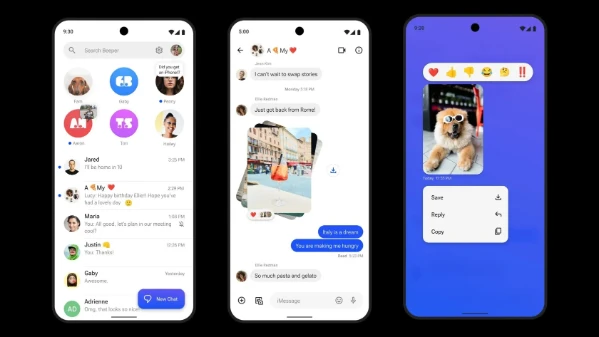
For normal text-based communication, Beeper covers far more than simply displaying incoming messages. Its current feature set includes sending and receiving messages, group conversations, photos and videos, replies, emoji reactions, stickers, disappearing messages, threads and several other common chat functions, although availability depends on the original service. Users can search conversations from different accounts without opening each separate application, which is useful when the important detail is remembering the person or subject rather than remembering whether the conversation happened on Signal, WhatsApp or Telegram. This unified approach is especially noticeable for people who use one set of messaging services privately and another set for work, communities or professional contacts.
One of the more significant changes introduced in August 2026 is Merge Chats. It addresses a problem that appears once several accounts are connected: the same person may contact you through two or three different services. Instead of treating those conversations as completely unrelated entries, Beeper can merge chats belonging to the same person into a single view. The underlying services remain separate, but the conversation history becomes easier to follow from the user’s side. Someone who sends a Telegram message one day and a WhatsApp message the next no longer has to occupy two completely separate places in the inbox simply because the messages travelled through different services.
Beeper also expanded its organisation tools during 2026. Labels can separate conversations into groups such as work, family or close contacts, reducing the need to treat every incoming conversation as equally urgent. The mobile interface includes a customisable space bar for frequently used areas, while supported services can use polls from within Beeper. Earlier in 2026, message requests from services such as Instagram and X gained their own Requests area, and Telegram users received an option to display topics from large groups as separate spaces. In September, Tumblr messages were added as another supported source of conversations. These changes show that Beeper’s role in 2026 extends beyond collecting messages: an increasing amount of attention is being given to controlling how a large combined inbox is organised.
Where Beeper Still Depends on the Original Apps
Audio and video calls remain one of the clearest limitations. Beeper does not currently provide full in-app calling for connected services. When a supported service receives a call, Beeper can show a notification or an entry in the conversation that helps the user move to the original application, but the call itself takes place there. This makes keeping apps such as WhatsApp, Signal or Telegram installed sensible for anyone who regularly uses voice or video calling. On Android and iOS, notification settings can be adjusted so that Beeper handles ordinary message alerts while the original application remains responsible for call notifications, which can reduce the duplicate notifications that would otherwise appear.
There are also service-specific features that do not transfer completely into Beeper. WhatsApp, for example, still has functions that require the official application, including some status, media and calling features. Similar differences exist elsewhere because each connected service has its own rules and technical capabilities. A reaction, sticker, thread or disappearing-message option may work well on one service but be limited on another. Beeper therefore works best when it is treated as the main place for routine conversations rather than as a guarantee that every specialist function from every original app will be reproduced exactly.
The same point applies when starting new conversations. Beeper’s documentation currently identifies services such as WhatsApp, Google Messages, Telegram, Signal, Messenger, Instagram and Slack as supporting the creation of new chats from within Beeper, but this ability is not universal across every connected account. Existing conversations can consequently be much easier to centralise than every possible account-management task. Profile changes, unusual privacy controls, some group-management functions and other service-specific settings may still require the original application. Keeping important native apps available provides a straightforward fallback and avoids turning an inbox-management tool into a single point of inconvenience when a less common feature is needed.
Privacy, Security and Cost of Using Beeper
The introduction of on-device connections changed Beeper’s privacy model substantially. For a supported on-device account, Beeper says messages communicate directly between the device and the original messaging service rather than being stored on Beeper’s servers. The company also says this method maintains end-to-end encryption for services that support it. Cloud connections work differently: account data passes through Beeper’s infrastructure so conversations can be delivered to the user’s signed-in devices. That convenience means users should pay attention to which connection type they select instead of assuming that all connected accounts follow the same data path. Beeper is part of Automattic, the company that also owns services including WordPress.com, Tumblr, Pocket Casts and Day One.
Using Beeper should not be interpreted as making every messaging account identical in security terms. WhatsApp, Signal, Telegram and Discord have different encryption models and account systems before Beeper is involved. Connecting an account also requires giving Beeper the access necessary to send and receive messages on that account. Beeper itself has acknowledged that using a universal messaging application can introduce a different security model from using an encrypted service such as Signal entirely through its own application. Users handling especially sensitive conversations should therefore look at both the security of the original service and the connection method being used in Beeper rather than relying only on the convenience of a combined inbox.
Beeper can be used without a paid subscription. Its current free plan supports up to five accounts, which is enough for someone who mainly wants to combine services such as WhatsApp, Telegram, Signal, Discord and one additional account. Beeper Plus is listed at $9.99 per month or $99.99 per year and raises the total account allowance to ten while adding features such as multiple accounts from the same supported service, scheduled sending, reminders, Incognito Mode and voice-note transcription. Beeper Plus Plus is aimed at heavier multi-account use and is listed at $49.99 per month or $499.99 per year, with unlimited accounts. Beeper also began offering limited free uses of several Plus functions in August 2026, allowing free users to try features such as scheduled messages, reminders, labels and voice-note transcription before subscribing.
Who Beeper Is Most Useful For in 2026
Beeper is most useful when the main problem is fragmentation rather than a lack of messaging features. Someone with active WhatsApp family groups, Telegram communities, Signal contacts, Discord conversations and work messages can reduce the number of separate inboxes that require constant checking. The benefit becomes greater when the same contacts appear on several services, particularly now that Merge Chats can place their conversations together. People who switch repeatedly between a desktop computer and a phone can also benefit, although the ideal connection type depends on whether easy multi-device access or keeping messages away from Beeper’s servers has the higher priority.
It is less suitable as a complete replacement for every original messaging application. Users who spend much of their time on voice and video calls will still move back to the native apps, and people who depend heavily on service-specific features may encounter functions that Beeper does not reproduce. The same applies to anyone who wants the simplest possible security arrangement for a highly sensitive encrypted account: using the original app alone avoids introducing another application with access to that account. These limitations do not prevent Beeper from being useful, but they are important when deciding which accounts to connect and which original apps should remain part of the daily setup.
In 2026, Beeper is therefore best understood as a practical communication organiser rather than a new messaging network competing with WhatsApp, Telegram or Signal. It allows existing accounts and contacts to remain where they are while providing a shared place to read, answer, search and organise many of their conversations. The newer on-device connection option gives users more control over how message data is handled, while features such as Merge Chats and Labels make a large combined inbox easier to manage. The sensible setup is to connect the services used most often, choose the appropriate connection method for each one, retain native apps where calls or specialist features are still required, and then use Beeper as the everyday inbox that reduces unnecessary switching between separate messaging applications.