Gemini Notebook in 2026: How Google’s Mobile App Turns PDFs, Videos and Documents into Learning Materials
Studying from a collection of PDF textbooks, recorded lectures and online articles often means spending more time organising information than actually learning it. Google’s Gemini Notebook, previously known as NotebookLM, offers a different approach. The application brings educational sources together and uses artificial intelligence to create summaries, audio discussions, video explanations, flashcards and practice questions. In 2026, students can access many of these features directly from Android phones and iPhones, making it easier to revise during a journey or between classes. Recent updates have introduced short educational videos, additional quiz formats and more interactive ways to work with study materials. However, understanding which features are available on mobile, how the application processes uploaded content and where its limitations lie is essential before relying on it for coursework or examination preparation.
What Is Gemini Notebook and How Does It Work in 2026?
Gemini Notebook is Google’s AI-powered research and learning application that works primarily with information provided by the user. Originally introduced as Project Tailwind in 2023 and subsequently released as NotebookLM, the service received its current name in July 2026. The change did not require existing users to rebuild their collections: previously created notebooks remained accessible. Unlike a conventional chatbot that can answer questions using broad general knowledge, Gemini Notebook is designed to concentrate on selected sources. Students can upload educational documents, add relevant websites or include supported YouTube videos, then ask questions about the information they contain. This approach is particularly useful when an answer needs to reflect a specific textbook, course syllabus or collection of research materials rather than a general internet explanation.
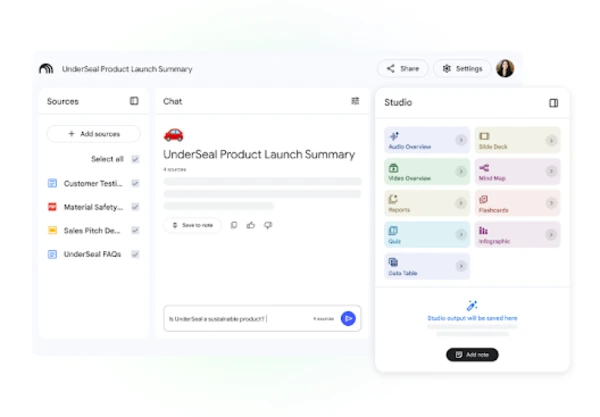
The application organises information into individual notebooks, each dedicated to a subject, assignment or project. For example, a biology student might create a notebook containing lecture notes about human anatomy, several research papers and a recorded university presentation. Instead of searching through every document separately, the student can ask the application to explain the relationship between different biological processes or identify information relevant to an upcoming assessment. Gemini Notebook searches the selected material and generates an answer with references to its sources. These citations are important because they allow users to examine the original information rather than accepting the AI-generated response without checking it. A well-organised notebook can therefore function as both a study collection and a searchable reference library.
Google provides Gemini Notebook through its website and dedicated mobile applications for Android and iOS. The mobile version supports creating notebooks, importing common source types, asking questions and using several AI-generated learning tools. It also works alongside notebooks available within the wider Gemini service, with synchronisation helping users continue their research across supported devices. Nevertheless, the mobile experience is not identical to the desktop version. Some advanced document formats, reporting tools and editing options require access through a web browser. Availability and usage allowances may also depend on the user’s Google account and subscription. For most students, the mobile app is especially convenient for reviewing existing materials and completing shorter study sessions, while a computer remains useful for preparing larger research collections.
Installing the App and Creating Your First Study Notebook
Getting started requires a compatible Android or iOS device and a Google account. The application can be found in Google Play or Apple’s App Store under its current name, Gemini Notebook. Users who previously installed NotebookLM may simply need to update the existing app. After signing in, they can create a notebook and give it a descriptive title, such as European History Revision or Introduction to Economics. Clear titles become particularly valuable when several subjects are being studied simultaneously. The next step is adding relevant material through the source selection options. On mobile, supported inputs include PDF files, website links, YouTube URLs, audio recordings and copied text. Students can also send supported content from other applications using their device’s Share menu.
One practical method is to begin with a single PDF containing lecture notes. Open the notebook, select the option for adding a PDF and choose the document from the device. Once the file has been processed, Gemini Notebook can provide a general overview and answer questions about individual sections. Rather than requesting a vague summary, students can ask something specific, such as which theories appear in Chapter Four or how two historical events are connected. They can then add a second source covering the same topic and request a comparison. This gradually builds a collection in which different materials support one another. Source selection also allows users to temporarily exclude unrelated documents from a particular question, helping to keep the generated answer focused.
For effective organisation, it is worth separating unrelated subjects instead of uploading everything into one notebook. A student preparing for mathematics and literature examinations, for instance, will usually obtain more relevant answers from two dedicated collections than from a single collection mixing formulas, novels and essays. Source quality matters just as much as organisation. Clear, complete documents generally provide better material than poorly scanned pages or incomplete extracts. Before generating revision resources, check that the correct files have been imported and that important sections are present. Students should also remember that uploaded material may contain outdated information or factual mistakes. Gemini Notebook can help explain those sources, but it cannot guarantee that everything written in them is correct.
Turning PDFs, YouTube Videos and Documents into Useful Study Resources
PDF support is one of Gemini Notebook’s most practical functions because textbooks, lecture handouts, academic papers and revision guides are frequently distributed in this format. A lengthy PDF can be used to generate a concise explanation of its main arguments, definitions and supporting evidence. For example, a student working through a 70-page environmental science report could ask for the principal causes of biodiversity loss discussed in the document, followed by a comparison of proposed conservation measures. The answer can include references pointing back to the source. Students can also request simpler explanations of unfamiliar terminology without manually copying entire sections into another application. However, complicated tables, unusual layouts and scanned pages deserve additional checking because automated interpretation may miss important details.
YouTube videos offer another valuable source of educational material. Gemini Notebook accepts supported public YouTube links and processes the available captions or transcript rather than analysing every visual frame as a human viewer would. This distinction is particularly important for lessons involving diagrams, laboratory demonstrations or mathematical calculations written on screen. For instance, a narrated history lecture may provide an excellent transcript for summarisation, while a silent geometry demonstration cannot be interpreted in the same way. Videos generally need available captions, and recently uploaded content may not always be immediately accessible. After importing a suitable lecture, students can request a list of key arguments, explanations of unfamiliar concepts or questions based on the speaker’s discussion. They should still watch relevant sections when visual information is essential.
Documents can also be transformed into material that is easier to review, although supported formats differ between the mobile app and the full web experience. The browser version accepts a wider collection of file types, including Google Docs, Google Slides, Microsoft Word documents and several text-based formats. A useful workflow is to collect lecture notes in a document, import them into Gemini Notebook through a supported method and generate revision questions from the content. Students working mainly on smartphones can use PDFs or copied text when a document format is not directly supported by the app. Google also supports audio sources, making recorded explanations or spoken lecture notes useful additions. The result is a collection containing written and spoken information that can be searched, compared and repurposed for studying.
Creating Audio Overviews, Educational Videos, Flashcards and Quizzes
Audio Overviews transform selected source material into spoken explanations, often presented as a discussion between AI-generated speakers. Instead of reading another lengthy summary, students can listen to the central ideas of a document while travelling or taking a break from screen-based study. The content is based on the notebook’s sources, so the quality of the explanation depends on the material provided. Audio Overviews are not simply recordings of the original documents; they reorganise information into a more conversational format. In the mobile app, supported overviews can be saved for offline listening, although this differs from exporting an ordinary audio file to the device. They are particularly helpful for reinforcing familiar material, but equations, detailed charts and precise quotations are still better checked against their original sources.
Video Overviews provide a more visual way to explain information through narration, illustrations and educational sequences. In October 2026, Gemini Notebook also offers Short Video Overviews lasting approximately 60 seconds, designed to introduce individual concepts without requiring a lengthy presentation. These short explanations support more than 80 languages and can help students revisit a complicated definition or scientific process before a lesson. Longer video formats can also organise information into narrated visual presentations, with availability and creation options varying by account and device. An important distinction is that generating a Video Overview from a PDF or YouTube transcript does not mean the application has converted the original video footage directly into a new film. The generated content is an AI-created explanation based on the information available in the notebook.
Flashcards and quizzes are especially useful when students need to remember information rather than merely read it. Flashcards can turn source material into questions about terminology, dates, definitions or important relationships, while quizzes provide a way to check understanding. Users can customise certain aspects of these activities, including topic, difficulty and the number of questions. By October 2026, Google’s expanded quiz formats include short-answer, multiple-select and fill-in-the-blank questions. The application can also help learners review their performance and identify areas requiring further attention. For example, someone preparing for a chemistry examination could generate questions about atomic structure, complete a quiz and then request additional explanations for incorrectly answered topics. Reviewing the original course material remains necessary when the generated questions appear ambiguous or inaccurate.
Practical Benefits, Limitations and Privacy Considerations
Gemini Notebook is most valuable when used as part of a structured learning routine rather than as a replacement for studying. Consider a university student preparing for an examination in modern European history. On the first day, they might collect lecture PDFs and relevant reading material into a notebook. The next day, they could listen to an Audio Overview covering the main historical developments. Later, they could generate flashcards for important dates and use a quiz to check whether they understand the causes and consequences of significant events. Before the examination, questions directed at particular documents can help clarify confusing points. This sequence combines reading, listening, recall and self-assessment instead of relying on repeated passive reading, which may feel productive without revealing gaps in understanding.
Mobile access is especially convenient for short learning sessions. Students can review flashcards while waiting for transport, listen to previously saved audio during a journey or ask a question immediately after a lecture. Google’s September 2026 updates also introduced mobile audio recording capabilities for capturing spoken notes and other learning material, alongside developments in voice-based interaction. These features can make it easier to preserve explanations while they are still fresh in memory. Nevertheless, recording a classroom discussion requires attention to school policies, local privacy rules and the permission of people involved. It is also sensible to check the captured material before using it for revision. Background noise, unfamiliar terminology and overlapping speakers can affect the accuracy of audio transcription and any learning materials subsequently generated from it.
There are practical limits to consider before choosing Gemini Notebook as a primary study tool. The full browser experience supports more source formats and advanced output options than the dedicated mobile application. Certain activities, including creating some reports, detailed notes, mind maps and data tables, may require the web version. Google has also introduced flexible usage allowances that take account of factors such as the complexity of a request, conversation length, number of sources and generated outputs. For consumer accounts, these allowances began refreshing every five hours under changes introduced in September 2026, although available capacity depends on account eligibility and other conditions. Students working with extensive research collections should therefore plan important tasks in advance and avoid assuming that every feature is unlimited or available on every device.
How to Use Gemini Notebook Safely and Get Better Learning Results
The most reliable way to use Gemini Notebook is to treat its answers as interpretations of study sources rather than unquestionable facts. Even when an answer contains citations, the AI may misunderstand a passage, overlook an exception or combine information incorrectly. This is particularly relevant when working with medical subjects, legal materials, scientific research or numerical evidence. Users should follow citations back to the original documents and confirm details such as dates, statistics and quotations. If two uploaded sources disagree, ask the application to describe their differences instead of automatically deciding which one is correct. For academic assignments, references should be taken from the original publications and formatted according to the institution’s requirements. An AI-generated summary is not a substitute for reading the evidence behind an important claim.
Privacy deserves similar attention. Google’s published information states that personal notebook data is not used to train its models unless the user provides feedback, while organisational and educational accounts have additional data protection arrangements. Sources generally remain private unless the user chooses to share a notebook, but users should still review the relevant privacy terms and sharing settings. Confidential workplace documents, unpublished research and other people’s personal information should not be uploaded without appropriate permission. Students using university accounts should also check whether their institution permits external AI tools for coursework. Before sharing a notebook with classmates, inspect its contents carefully: a collection may contain private notes or documents that were never intended for wider distribution. Responsible use starts with understanding what has been uploaded and who may be able to access it.
Better study results usually come from clear questions and carefully selected sources. Instead of asking Gemini Notebook to explain an entire subject, request a comparison of two theories, a definition with supporting evidence or five questions about a particular chapter. After receiving an answer, identify what remains unclear and ask a follow-up question using the same material. Alternating between explanations, flashcards, quizzes and original documents can make revision more purposeful. Gemini Notebook is particularly useful for organising scattered information and turning existing course content into manageable learning activities, but it does not replace practical exercises, independent judgement or guidance from qualified teachers. In 2026, its combination of mobile access, source-based answers and varied study formats makes it a useful companion for learners who understand both its capabilities and its limitations.