Adobe Express Mobile: Can One App Handle Editing, Covers, Subtitles and Short Videos for Social Media?
Content creation for social networks increasingly happens on a smartphone. Creators record short clips, design covers, trim footage and add subtitles without ever opening a desktop editor. Adobe Express Mobile has become one of the tools trying to consolidate these tasks into a single workflow. The application combines visual templates, video editing, AI-based text tools and quick publishing features. The key question in 2026 is whether it can realistically replace several specialised apps used for editing, thumbnails, subtitles and short-form videos.
What Adobe Express Mobile Actually Offers in 2026
Adobe Express Mobile is designed as a simplified creative tool built on Adobe’s ecosystem. The application integrates with Creative Cloud services and provides quick editing tools aimed at social media creators rather than professional video editors. Users can create graphics, edit short videos, generate captions and prepare posts for different social networks without switching between multiple apps.
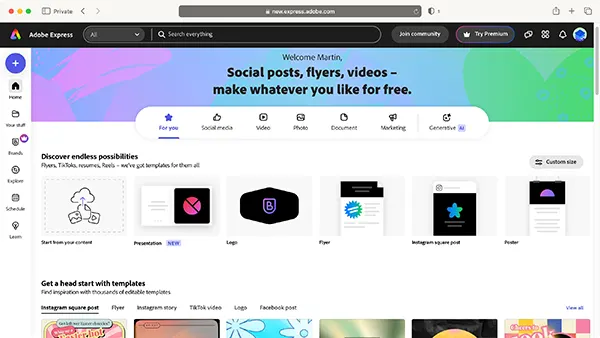
One of the main strengths of the app is its template system. Adobe provides thousands of ready-made layouts for posts, covers, reels and vertical video formats. These templates are automatically adjusted for different screen ratios, which helps creators avoid manual resizing when publishing on Instagram, TikTok, YouTube Shorts or Facebook.
Another key aspect is the integration of AI features. In 2025–2026 Adobe expanded its Firefly technology inside Express. Mobile users can now generate background images, extend photos, remove objects and quickly create visual elements using text prompts. For creators who publish frequently, this reduces the time required for design preparation.
How the Mobile Version Differs from Desktop Creative Tools
Unlike Adobe Premiere Pro or After Effects, Express Mobile focuses on speed rather than technical depth. The editing timeline is simplified and built for short clips rather than long video production. Users can trim clips, add transitions, insert text overlays and adjust colour presets, but advanced cinematic editing tools remain outside its scope.
The application is optimised for vertical content. Most editing presets and templates assume a 9:16 format, which reflects the dominance of short-form social media video in 2026. This makes the workflow quicker for creators who mainly publish reels, stories or short updates.
Another difference is the cloud-based workflow. Projects can be opened across devices through an Adobe account, meaning that a design started on a phone can later be refined on a desktop. This hybrid workflow is particularly useful for small teams or solo creators who produce content across several devices.
Video Editing and Short-Form Content Production
Short video production is one of the main areas where Adobe Express Mobile competes with dedicated editing apps. The toolset includes clip trimming, speed adjustments, music insertion and simple transitions. While these features are basic compared with professional editors, they are sufficient for producing reels, promotional clips or quick educational videos.
Audio integration is also built into the workflow. The app includes a music library with tracks cleared for social media usage. Users can synchronise clips with music beats or apply automatic timing adjustments, which simplifies the creation of fast-paced content often used on TikTok or Instagram.
Export options are tailored for social media formats. Instead of complex rendering settings, users select predefined resolutions suitable for different networks. This reduces technical errors and ensures the video fits platform requirements without additional conversion.
Automatic Subtitles and Text Tools
Subtitles have become essential for short video content because many viewers watch videos without sound. Adobe Express Mobile includes automatic speech recognition that generates captions directly from recorded audio. In 2026 the system supports dozens of languages and provides reasonable accuracy for clear speech recordings.
After captions are generated, users can edit them visually within the timeline. Text style, font, colour and background blocks can be adjusted to match the visual style of the video. This is particularly useful for educational clips, tutorials and commentary videos where readable subtitles increase viewer retention.
Another useful feature is animated text. Creators can apply motion presets that make subtitles appear dynamically rather than as static captions. These effects imitate the style commonly seen in viral short-form content and require only a few taps to apply.
Designing Covers, Thumbnails and Visual Posts
Beyond video editing, Adobe Express Mobile also targets graphic creation tasks. The application includes tools for designing covers, thumbnails and promotional images using layered editing and drag-and-drop elements. This makes it possible to prepare YouTube thumbnails, podcast covers or social media banners without switching to another design tool.
The built-in asset library contains fonts, icons, stock images and background textures. Many of these assets come from Adobe Stock collections adapted for quick use inside the app. Creators can combine these elements with their own images or screenshots when designing visual materials.
Another helpful feature is automatic background removal. A creator can upload a photo, isolate the subject and place it onto a new background in seconds. This is commonly used for thumbnails, where a presenter’s face or product image needs to stand out against a contrasting design.
Can One Mobile Tool Replace Several Content Apps?
In practice, Adobe Express Mobile can handle a large portion of everyday creator tasks. For quick video edits, subtitles, graphic covers and basic promotional visuals, the app provides enough functionality to produce ready-to-publish content. Many creators who previously used separate tools for captions, design and editing can now complete these steps within a single environment.
However, there are still limitations. Complex editing workflows, detailed colour grading or multi-layer video production require specialised software. Express Mobile focuses on speed and accessibility rather than full professional control. For large projects or cinematic editing, desktop tools remain essential.
For social media creators who prioritise fast publishing and mobile workflows, the app can significantly simplify the production process. In 2026 it represents one of the clearest examples of how content creation tools are moving toward all-in-one mobile solutions that support filming, editing and publishing from a single device.